

← FAQHow do I find my Session Report in Invokers: Titan Legacy?
FAQ

How do I find my Session Report in Invokers: Titan Legacy?

From the main screen, tap the Quick Menu button in the top right-hand corner.

How do I find my Session Report in Invokers: Titan Legacy?


In the Quick Menu, go to Settings.

How do I find my Session Report in Invokers: Titan Legacy?


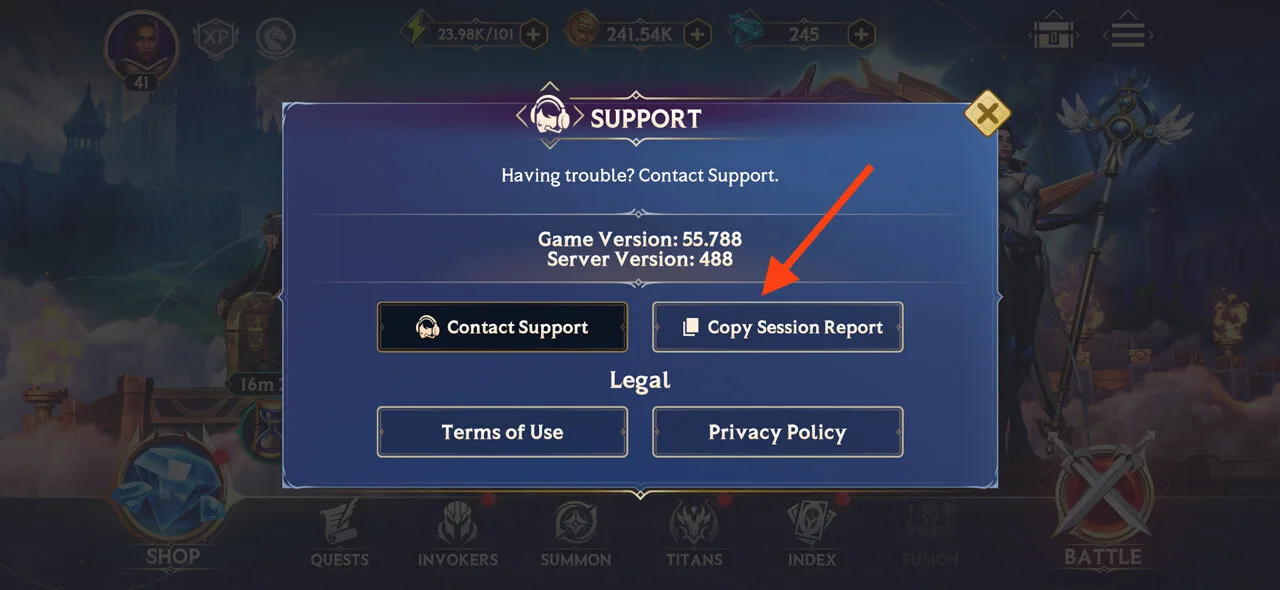
In the Settings menu, simply tap “Copy Session Report” and that’s it! Your Session Report will be copied to your clipboard and you can share it when needed.

How do I find my Session Report in Invokers: Titan Legacy?


More guides

Play Invokers

Mobile

Scan to download Invokers on your phone
Download on the App StoreGet it on Google Play

Desktop

Download for PC & Mac

Join the official Invokers Community

Join Discord

Log out?

You'll be signed out of Invokers: Titan Legacy on this device.